


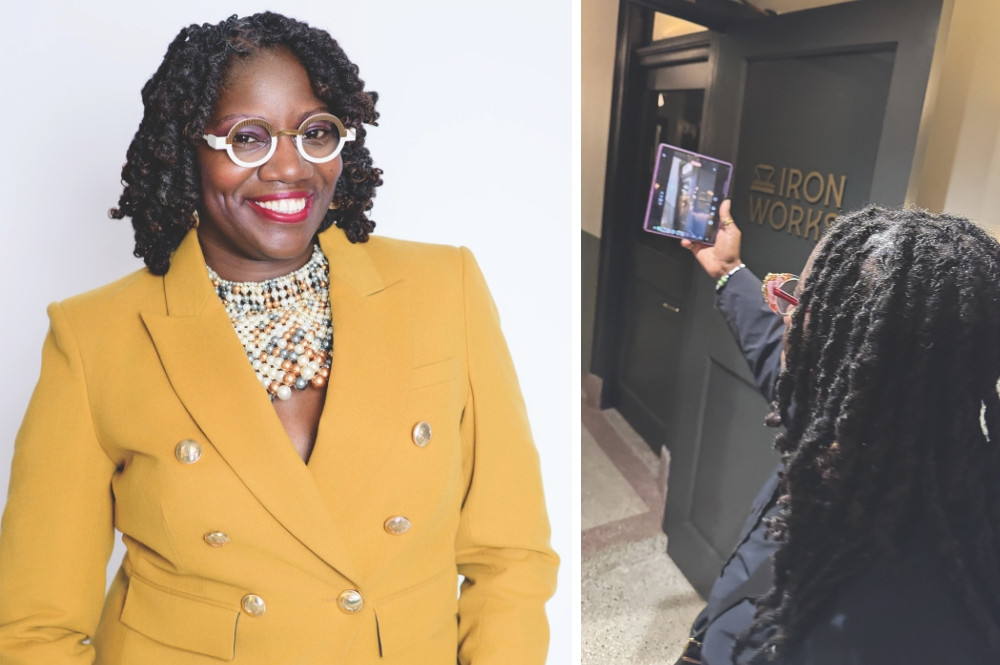
It was during a recent fam trip to Asheville, North Carolina, that I spotted a meeting planner attendee being perhaps a little too focused on her photography during the many site tours. Or maybe it was the slick Samsung Galaxy Z Fold6 phone she was pointing here and there that really caught my eye.
Regardless, my attention was piqued, as her efforts rose above and beyond what any other planner I’ve been on a fam with demonstrated. I soon discovered her technique was a studied but relatively simple way to leverage AI to ensure that meeting and event planning teams, and clients, are all on the same page when it comes to sussing out venue options beyond what may be shown in a splashy brochure.
[Related: Asheville, North Carolina, Shines on Meeting Planner Fam Tour]
How to Create Immersive Video Experiences on Meetings Fams
Tya Bolton, CEO of Charlotte, North Carolina-based Exceptional Business Solutions, the aforementioned planner photo snapper, explained that she was chronicling the site visits to share with clients and her six-person planning team as part of their site inspection strategy.
“I’ve always been into capturing content, and I think that because we’ve been a virtual company for so long, it was always important for me to make sure that we had really high-quality photos and videos to share with our clients so they would feel like they were there,” Bolton said. “That kind of took on a whole element of its own, and then we started to be a bit more strategic with it. So, there’s a process that I have that I’ve now been using for years.”
Looking back through her Google Photos folders, Bolton—a self-described tech early adopter—said she was surprised to realize she embarked on this process in 2017, with a Samsung Galaxy Note phone. Not to be denied the latest tech tool, she recently upgraded to the Samsung Galaxy Z Fold7.
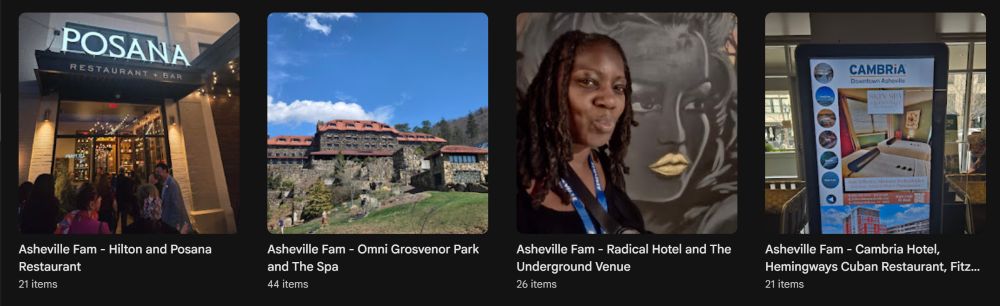
Bolton first takes a photo of a logo or other branding when she enters a new venue or room, which will help identify the property/space later and also will be picked up by AI in the video production process. Everything from the Google Photos folder is automatically backed up in the cloud, whether the photos and videos are from her phone or another source, such as WhatsApp (via shares from other planners on the site inspection). The folders are later broken up into subfolders.
“I like to tell our clients they’re going to have an immersive experience—‘I’m going to give this to you with the best high-quality images so that you feel like you were there,’” she said. “You’ll also hear me record my voice while we’re in the venue. I’ll be repeating back what I’m hearing from whoever’s guiding us through the tour, or just having their voice on there.”
[Related: Lessons From AI Power Users for Planning Meetings]
This narration also aids AI in the production process, like a virtual director.
Most of a venue’s offerings are on the shot list, from the lobby, guest rooms and breakout rooms to outdoor space, ballrooms, pool, spa and other amenities.
“I am recording everything—I am getting every inch of that room,” she emphasized. “I’m recording the sockets on the floor where we can plug into electricity, and how many ways we can divide the room. I’m capturing everything because, especially in this economy, people are in a crunch and they’re waiting until the last minute, so it can really slow the process down if we have to get into all those technical questions. I then can just address those during the presentation, which helps us to move through it a little bit faster.”
When capturing content, Bolton tends not to focus on the specific needs of a single client, so the finished product can be shared with other clients in the future. She typically creates a final version for each client with the video embedded in a PowerPoint presentation.
See the Video!
AI Tips for Turning Photos Into Video
While onsite photo shoots deliver real-world examples of how a venue can be used (including any imperfections that may not appear in the brochure), it’s AI that stitches it all together in a tidy package wrapped with a bow.
Bolton uses Perplexity AI software, which allows users to generate short video clips from text prompts.
“Perplexity allows you to use a computer mode, and in the computer mode, it can literally access everything on your screen,” Bolton said. “You can give it access to what’s in your browser. It can respond to a LinkedIn post for you. So. I’ve given it access to my Google Photos.”
It’s important to remember that while AI-generated videos may not be challengers in the Academy Awards’ short-film categories—not yet, anyway!—AI’s rapid deployment, minimal cost and low barrier of production expertise makes it an easy option that will only improve with increased usage and familiarity.
[Related: Top 7 AI Uses from Event Profs in the Know]
AI, of course, is all about accurate prompts, so Bolton offered the following LLM (large language model) prompt ideas:
I just finished a site inspection in [CITY] and want a short promo video to share with my event clients.
My company: [COMPANY] — [website.com]
Photos: [album link or attached files]
Featured hotels & venues: [list by name]
Must-show landmarks: [list]
Please create a 60- to 90-second MP4 with:
- Energetic narration in a warm, professional voice
- The name of each hotel, venue and landmark on screen as it appears
- Gentle motion on each photo and upbeat royalty-free music
- A closing card with my logo, tagline and website
- Before you render, show me the script and shot order so I can approve.
In the end, it’s all about sharing content with planning teams and clients that show the “real-world” aspects of a meeting venue, warts and all, that you won’t see in official marketing materials.
“It’s real-world, and I think that’s what people want—the real world,” Bolton said. “I have the proximity in the bedroom. I can touch the sheets on the bed and I can look out. I can open the curtains and show you what’s outside of that window. Are you going to be looking at a building or are you going to be looking at the ocean? And I can show you that by taking the photos and the videos while I’m there.”
More Content About How Meeting Planners Can Leverage AI
Tya's Tips for Event Professionals When Shooting Content Onsite
Bolton shared the following tips for planners wanting to up their onsite photo and video game:
- Shoot with intention: Capture each hotel’s lobby, a guest room, the rooftop or signature F&B outlet, and at least one event space. Add a horizontal and a vertical image of every hero landmark.
- Set the scene: Get a clean shot of the property’s name plate or signage at each venue. AI can use it to verify identity later.
- Sense of place: Take one photo of your business card or a branded place card at a key meal. It makes a perfect mid-video “presented by [you]” beat.
- Feed the AI: Keep a quick voice memo at each stop naming the location and one selling point. Attach it to the prompt; the AI can mine it for script copy.
- Magic voiceovers: Save a 20- to 30-second voice sample of yourself reading anything. Paste it into ElevenLabs software (or share with the AI) and you can swap the placeholder narration for your own voice in minutes.
- Cater to your audience: Tell the AI who the video is for. (Incentive planners? Association meeting planners?) The script tone changes meaningfully.
- Create once, publish everywhere: Ask for the shot list and script as separate files. You’ll reuse them in proposals, RFP responses and Instagram captions long after the video deploys
More Meetings Best Practices Tips
Tips for Producing Videos From Photos Using AI
Following are some other key tips for meeting planners creating onsite video content from site inspections.
Plan Ahead
The video capture process, of course, begins long before entering the first event venue, so try to put yourself in the mind of your clients by addressing the following questions during the shoots:
- What questions will clients likely ask later?
- What spaces are most relevant to the program?
- What venue details may impact attendees’ onsite experience?
Get It All
“Over-shooting” is always a dilemma when capturing video content, so try to be judicious. But try to prioritize the following:
- Real-world perspectives instead of generic “marketing” shots
- Room layouts, sightlines, outdoor spaces, suite upgrades and unique venue features
Don’t Forget the Basics
It’s easy to overlook the details when touring venues that are putting their best face forward by focusing on the more splashy aspects of their facilities, so make sure to capture:
- General session and breakout rooms
- Divisible room configurations
- Guest rooms and suites
- Outdoor event spaces
- Pools, spas and amenities
- Power locations and floor connections
- Hallways, entrances and wayfinding routes
Organization Is Your Friend
Create subfolders of each property, and perhaps folders within the subfolders with the following categories:
- Meeting rooms
- Guest accommodations
- Outdoor venues
- Restaurants
- Recreational amenities
- Public spaces